
Trade System
Enhance your Minecraft experience with the Trade System addon, introducing a seamless and balanced trading mechanism. A user-friendly, fun, fair, and incredible way to conduct trades.
1,112
Trade System
How its looks?
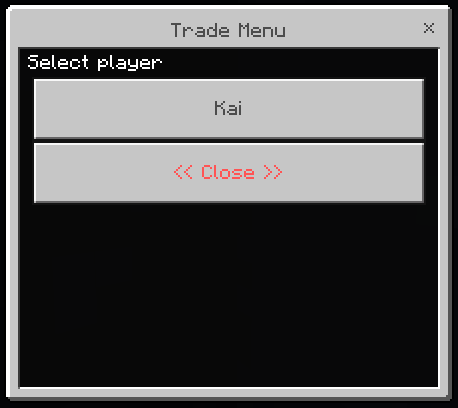
How to send request to trade:
Type: /trade <player_name>
- Example 1: /trade Paoeni
- Example 2: /trade "Username with Space"
You can just type /trade to open Trade UI!
How to turn off Trade:
If you don't want anyone send trade to you, you can just do this
Type: /tradesetting <On/Off>
- Example 1: /tradesetting On
- Example 2: /tradesetting Off
If you turn off your trade, anyone can't send you a trade and you can't send trade.
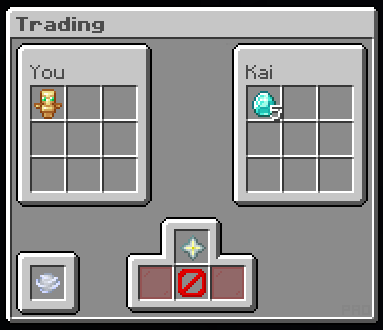
Quick explation for the UI:
- Nether Star: Click to add item.
- Glass Pane: Ready Button (Red for NOT Ready & Green for Ready).
- Wind Charge: To refresh the UI, double check the item before Ready.
- Barrier: To cancel the trade.
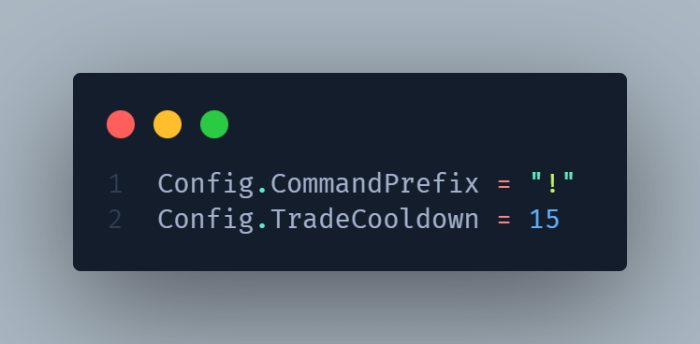
This addon have cooldown. (Default is 15 seconds)
You can configure the Cooldown or Prefix on Configuration.js file:
Still doesn't understand? Join my Discord server to ask!
You are permitted to:
- Use the addon packs as you see fit in-game.
- Modifying or configuring addon for personal use.
- Examine the code and works to learn more about the creation and development of addon
You are NOT permitted to:
- Change the codes and re-publish it as your own.
- Negate the accreditation of the original author.
- Paste the direct download link, negating the CurseForge page.
- Take the author's code, works, and textures just to republish them as your own.
Creator contacts:
- CurseForge Profile : https://www.curseforge.com/members/pao/projects
- Discord Community : https://paostudio.xyz/discord
- Discord : @paoeni
Changelog:None
More versions

All Rights Reserved
16/08/2025
00:41 17/08