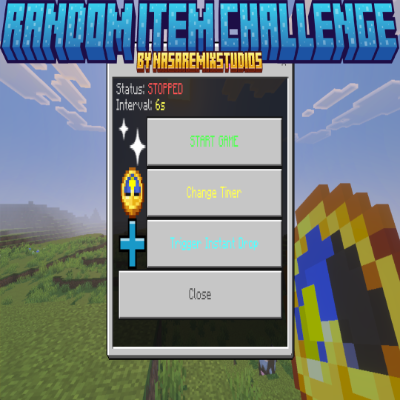
[Realm Compatible]Random Item Challenge
Random Item Challenge
This addon brings the viral Random Item Challenge to your world! Every few seconds, a completely random item will appear in your inventory. Will the item gods gift you Netherite & Beacons, or burden you with Dead Bushes & Poisonous Potatoes? There is only one way to find out!

You May Also Enjoy The Addons Below!!
[Realm Compatible] RPG Skills & Prestige: Evolved - Minecraft Bedrock Addons - CurseForge
How It Works
Once the game starts, a countdown appears on the screen. When it hits zero, EVERY player gets a unique random item added to their inventory. Admins have absolute control over the speed, loot pools, and chaotic events using a massive in-game menu.
Key Features
6 Customizable Loot Tiers (500+ Items!)
You are no longer limited to just "Safe" or "Chaos". Admins can toggle individual loot pools ON or OFF to create the ultimate custom challenge:
- Common: Wood, stone, dirt, and basic foods.
- Uncommon: Iron, gold, basic armor, and redstone.
- Rare: Diamonds, obsidian, and mob spawn eggs.
- Epic: Netherite gear, Elytras, and music discs.
- Legendary: Beacons, Nether Stars, Dragon Heads.
- Troll: Poison potatoes, rotten flesh, and wooden hoes.
20+ Insane Chaos Events
Every 10 drops, the game will trigger a random Chaos Event that affects everyone on the server! Prepare to survive:
- TNT Rain & Arrow Barrages
- Gravity Shifts & Sonic Booms
- The Great Swap: Instantly swaps the physical locations of all players!
- The Floor is Lava & Bouncy Castles
New Game Modes & Presets
Don't want to customize manually? Use the Game Presets menu to instantly apply setups like "God Mode", "Pure Chaos", or "Cursed Mode".
Bonus: Turn on Chest Mode to have items drop inside a chest at your feet instead of cluttering your inventory!
Getting Started
Step 1: Become an Admin
To access the settings menu, you must give yourself the admin tag: /tag @s add admin
Step 2: Open the Menu
You can manage the game anywhere, anytime using two methods:
- Hold a Clock in your hand and Interact (Right-Click / Long Press).
- OR Type
!menuin chat (or use/scriptevent nasa:menu).
Step 3: ScriptEvent Controls (For Command Blocks/NPCs)
/scriptevent nasa:start- Instantly starts the game./scriptevent nasa:stop- Instantly pauses the game./scriptevent nasa:drop- Forces a random item drop immediately.
⚠️ Important Requirements & Realms Setup
For this massive addon to function without errors, you MUST enable Cheats and the following experimental world setting:
- Beta APIs
Playing on a Server or Realm?
Because Bedrock does not allow direct activation of script experiments on active Realms, follow this specific deployment process:
- Create a new world (or download your current active Realm) to your local device.
- Navigate to World Settings, and toggle on Cheats and Beta APIs.
- Activate the Addon Behavior Pack and Resource Pack under your world settings.
- Upload this newly configured world file directly back to replace your active Realm slot!
-
Our Socials
- Nasaremix Studios Discord: https://discord.gg/6rjTGkRBzP
- YouTube Channel: https://www.youtube.com/@Nasaremixstudios
- Twitch Live Everyday: https://www.twitch.tv/nasaremixstudios
Usage Guidelines
What You Can Do:
- Use this addon for worlds, servers, realms, exploration, or learning.
- Share feedback and suggestions to help improve the addon.
- Enjoy its features freely within these guidelines.
- Produce and share gameplay media videos images etc, showcase videos, or live streams (Please credit Nasaremix Studios! and provide direct links do not create own).
What You Can’t Do:
- Do not create separate download links for the addon.
- Do not steal or copy any part of the addon for personal projects.
- Do not redistribute the addon as your own work.
- Do not edit or share modified versions of the addon.
Note
The ONLY official pages to download my addons are:
- Modbay (nasaremix)
- https://mcpedl.com/user/nasa-x-remix/
- https://www.curseforge.com/members/nasaremix/projects
Any other site or repost is unauthorized and may contain stolen or unsafe files.