
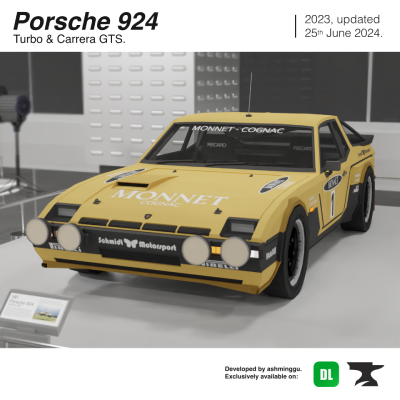
Porsche 924 Turbo & Carrera GTS add-on
• Special Thanks; TripleNoir over on Discord!
I would like to express my utmost gratitude to the aforementioned, TripleNoir/Kail West for his kind words of appreciation towards my work and for a very generous donation summing to USD40.00! Indeed, I cannot further express how much an actual donation means to me. As such, this addon is dedicated to Kail West! Thank you again to Kail West for the contribution!
• Car History
"Porsche executives soon recognised the need for a higher-performance version of the 924 that could take advantage of the model's excellent balance and bridge the gap between the standard 924 and the 911. Having already found the benefits of turbochargers on several race cars and the 1975 911 Turbo (930), Porsche chose to use this technology for the 924, eventually introducing the 924 Turbo in 1978. On release the 924 Turbo was met with high praise from the automotive community and journalists alike. It was celebrated for its supercar-like performance and impeccable handling, with build quality, general attention to proportion and more purposeful aesthetics garnering universal approval. Some criticised the turbocharged I4 for its coarseness, but critics forgave it in exchange for its economy and remarkable power increase over the naturally-aspirated car. In their comparison against the Aston Martin V8, Porsche 928, Porsche 911 3.0SC, BMW 635 CSI and Lotus Eclat 523, Motor Magazine found the 924 Turbo to be joint second in top-speed (achieving an average of 142 mph) and second in 0-60 mph acceleration (achieving a time of 6.9 seconds) being topped only by the Aston V8 at 145 mph and Porsche 911 at 6.5 seconds respectively, a remarkable feat considering the difference in displacement and price between the models. To power the 924 Turbo, Porsche heavily revised the VW EA831 2.0 L I4 motor already used in the n/a 924, opting to hand assemble the engine at the Porsche factory in Zuffenhausen, Stuttgart. Porsche engineers designed and equipped it with a revised crankcase, connecting rods, cylinder-head gasket, crankshaft and an all new aluminium-silicon alloy cylinder head. With the use of dished combustion chambers and specially shaped pistons the compression ratio was reduced to 7.5:1, this helped better accommodate the KK&K K-26 turbocharger without inducing pre-ignition. Platinum tipped spark plugs were also used and exhaust valve diameter was increased over the n/a engine.With 10 psi (69 kPa) of boost, output increased to 170 hp (127 kW) at 5,500 rpm and 181 lb⋅ft (245 N⋅m) of torque at 3,500 rpm. The 924 Turbo's engine assembly weighed about 65 lb (29 kg) more, so front spring rates and anti-roll bars were revised. Weight distribution was now 49/51 compared to the original 924 figure of 48/52 front to rear."
Source: Wikipedia
• Car details, colors and previews
- Has high speed, 2 seats, advanced animations (explained below) and advanced sounds (also explained below).
- Has the following functions: (7+2)
- Openable/closeable doors and trunk – Refer instructions below
- Acceleration – Car speed increases over time
- Immersive sound effects – Refer list below
- Dynamic hitboxes – Deals damage to entities that are ran over at a certain speed. Now also deals damage to other players! (5/5/22)
- Car explosion – Car explodes when destroyed
- Advanced animations – Working gauges, wheels and steering wheel
- Realistic car movements - Car tilts upwards/downwards when moving upwards/downwards.
NEW: POPUP HEADLIGHTS 2.0 + FUNCTIONAL HEADLIGHTS
Adding on to the current list of functions, starting with the Porsche 924, the popup headlights and actual headlights of the vehicle can now be toggled between on and off by the player whilst in the car! (Further elaboration can be found down in the tutorial section).
- Player-controlled popups system - The car's popup headlights can now be turned on/off by the driver whilst driving the car. (For variants with popup headlights)
- Player-controlled headlights system - The car's headlights can now be turned on/off by the driver whilst driving the car. (For variants without popup headlights)
Special thanks to redHoodie and RandomKerbal for allowing me to study the code for the Dynamic Hitboxes and Realistic Car Movements function. Highly recommend checking out their work as they make amazing vehicles and addons both from a functionality and design standpoint. (Links to their socials and MCPEDL page are listed below in this article).
- Has 2 variants, consisting of a few color and livery options. (Colors and images can be previewed below).
[Car Color Previews]:
[Extra Images]:
Car Color Previews
1) 924 Turbo
White Le Mans Special
 </figure>
Grey
<figure class="image"> </figure>
Red
<figure class="image"> </figure>
2) Carrera GTS
- Has an additional wide bodykit, bucket seats with harnesses, more efficient air ventilation (front hood scoop) and higher top speed.
White
 </figure>
Red
<figure class="image"> </figure>
80's Rallye - Walter Röhrl
<figure class="image"> </figure>
80's Rallye - Carrefour Livery, Kail West Special
<figure class="image"> </figure>
Extra Images
Rear profile
<figure class="image"> </figure>
<figure class="image">
</figure>
<figure class="image"> </figure>
Interior
<figure class="image"> </figure>
Engine Bay
<figure class="image"> </figure>
1) How to open the doors & How to open hood
i) Doors
To OPEN the doors, right click the car and the doors will open. Right click again to get in.
To CLOSE the doors, right click WHILE shifting/crouching.
ii) Hood
To OPEN the hood, right click WHILE shifting/crouching WHEN the doors are closed and the popup headlights will turn on!
To CLOSE the hood, right click WHILE shifting/crouching.
In a nutshell, the concept is basically;
Right click/hold + Shift/crouch = Open/close trunk and close doors
Right click ONLY = Open doors and to get in car ... (once the car's doors are open)
I've made a video showing how it's done so if you don't understand words, you can check that video out. The car in the video used is my previous Datsun 240z addon which shouldn't be a problem as the concept (animations, door and hood mechanics and sound effects) are the same for this addon (Porsche 924).
2) How to turn the popups or headlights on and off
Popup headlights / conventional headlights can now be turned on or off directly from inside the vehicle! When the popups or conventional headlights are turned on, the surroundings will also be lit up as an effect.
To TURN ON the headlights, right click whilst in the car.
To TURN OFF the headlights, right click when the headlights are on whilst in the car.
Note:
1) Headlights cannot be turned on when the hood is opened.
2) For variants which have popups, turning on the popups will slow down the vehicle slightly.
• Advanced sounds
In total there are 8 sound effects for the cars. The list are as follows:
Startup sound effect - When the player sits in the car
Driving sound effect - When the player drives the car
Custom car damage sound - When the car is damaged / takes a hit
Door closing sound effect - When the player closes the door
Door opening sound effect - When the player opens the door
Trunk closing sound effect - When the player closes the trunk
Popups on/off sound effect - When the player turns the popups on/off whilst in the car
Lights on/off sound effect - When the player turns the lights on/off whilst in the car
This addon DOES NOT REQUIRE (any type of..) EXPERIMENTAL MODE.
• How to obtain
Method 1: Get their spawn eggs from the Creative Inventory. They are classified as spawn eggs. You can search "Porsche" or “924” without the " for a more convenient way of getting them.
Method 2: Use /summon commands.
• Contacts & Credit
i) redHoodie (Special thanks for Dynamic Hitboxes code)
Twitter account: @redHoOOodie
MCPEDL account (Click here)
ii) RandomKerbal (Special thanks for Realistic Car Movements code)
MCPEDL account (Click here)
ii) ashminggu (Developer of this project)
Twitter account: @ashminggu
Email account: [email protected]
Youtube: Ashminggu Ashkali
• Warnings - Plagiarism - Code
1) You are NOT ALLOWED TO USE THE CODE IN THIS ADDON FOR COMMERCIAL USE. If you are really interested in using my code for commercial use, you must contact me first for permission. You may use my code for personal use without permission.
2) For Youtubers who want to review this addon, you may do so but if you plan on providing the link to this addon in your description, please use the MCPEDL or DuckCrumbs link and not the direct link (Mediafire link).
3) This addon is exclusive for MCPEDL & CurseForge. Any other websites/apps that distribute this addon without my approval are false and are an act of plagiarism.
4) This addon is also redistributed to the Chinese Minecraft Marketplace under authorization of @McCyoukou (Twitter). Please refer:
Note from the McCyoukou, authorized redistributor:
本人作品在网易我的世界的所有授权均归赤华所有,任何违法搬运都将受到举报,请自重。
I am authorized exclusively, and other Chinese developers are prohibited from moving, otherwise I will defend my rights.
• Confused about the download links?
So basically,
- Win10 = High speed version, suitable for race track maps. (0.65 mcm* = 28.6 ms⁻¹)
- Mobile = Lowered speed version, suitable for small city maps. (0.55 mcm* = 24.2 ms⁻¹)
- Classic = Win10 version, but without acceleration code.
Note:
• All the downloads above contain both the Behavior Pack (BP) and the Resource Pack (RP).
• "mcm" units = Minecraft Movement; value used in coding of MCPE entities. This is an unofficial value obtained from experiments and designated by ashminggu.