Ore Locator
Ore Locator — Minecraft Bedrock Addon
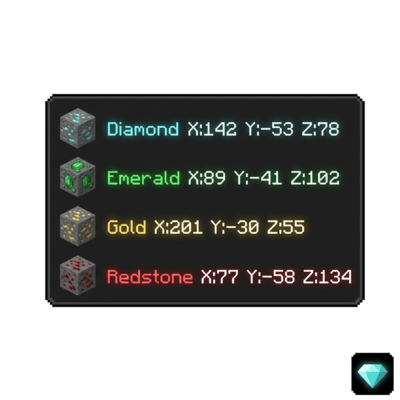
Ore Locator scans the blocks around you and shows the coordinates of the closest ores directly on your screen — no commands, no menus, no effort. Just load the pack and the nearest ores appear on your HUD automatically.
✅ No experimental features required. ✅ Achievement friendly.
What It Does
As soon as you load into a world with this pack applied, Ore Locator starts scanning nearby blocks and displays the 3 closest ores on your screen in real time. Each ore type shows its exact X Y Z coordinates and how far away it is. The display updates continuously as you move.
If there are no ores nearby, it tells you that too — so you always know what is around you underground.
Supported Ores
- Diamond & Deepslate Diamond
- Emerald & Deepslate Emerald
- Ancient Debris
- Gold & Deepslate Gold
- Iron & Deepslate Iron
- Coal & Deepslate Coal
- Copper & Deepslate Copper
- Lapis & Deepslate Lapis
- Redstone & Deepslate Redstone
- Nether Gold
- Nether Quartz
How To Use
- Step 1: Apply the behavior pack to your world.
- Step 2: Load into the world — Ore Locator starts automatically. No setup needed.
- Step 3: Look at the bottom of your screen to see the 3 closest ores with their coordinates.
- Step 4: To open the settings menu, hold any ore item or a Stick and use it (right click on PC, long press on mobile).
Settings Menu
Hold any ore item or a Stick and use it to open the settings menu. From there you can:
- Enable or Disable the ore display at any time
- Select which ores to track — turn off ores you do not care about like Coal or Iron
- Change the scan radius — 8, 16, or 32 blocks
Your settings are saved automatically and restored every time you rejoin the world.