
NeBux UI+
A simple ui pack which makes your regular gameplay more easier by adding multiple features
385,512
MY OTHER PACKS
ABOUT PACK
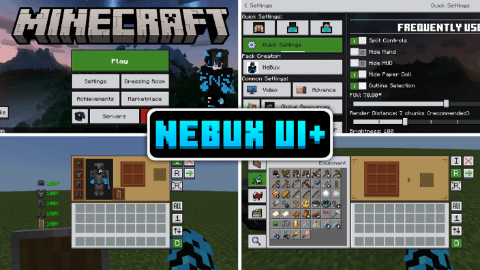
NeBux UI+ is a simple UI pack designed to enhance gameplay and improve accessibility in Minecraft Bedrock Edition. This pack refines the UI design while adding quick-access features that make navigation faster and more convenient.
FEATURES:
- Quick Settings – A new menu with frequently used toggles like FOV and Camera View for faster access.
- Quick Buttons – Adds shortcuts buttons like a direct Servers button and quick craft, quick drop, drop all, quick move etc. to skip extra navigation steps.
- Quick Craft & Quick Loot – Makes crafting and looting faster with optimized UI elements.
- F1 & F8 Buttons – Just like in Java Edition, F1 hides the HUD, and F8 toggles the paper doll.
- Exit Warning – Prevents accidental game exits by adding a confirmation prompt before quitting.
- Persistent Screens – Inventory, crafting, and other UI elements won’t close when the player takes damage.
- No Chat Input Limit – Removes the default character limit in the chat input box, allowing longer messages.
- Chat Quick Buttons – Adds Undo, Next buttons to improve chat interaction.
- UI Animations – Smooth animations that enhance the look and feel of the UI.
- Durability Viewer – Shows Armor and Tools durability "only on inventory screen".
- Trade Unlocker – Unlocks every trade so you don't need to level up every villager.
- Inventory Counter – Shows how many slots are left in your inventory.
- Inventory Full Warning – A simple warning shown at right top on HUD screen when your inventory gets full.
- Clock & Compass – Working compass and clock shown on HUD, no need to craft these.
- Xp Counter – Shows how much XP you have, visible in creative mode too.
- Enhanced Inventory – Better inventory buttons.
- Custom Containers – Every usable block like crafting table, furnace, etc. has custom GUI.
- Dimension Loading Screens – New loading screens according to the dimension.
- ToolTip Animations – Simple animation when switching items in hotbar, showing item name.
- Chat Select – A button on chat screen to select command or chat by clicking the line.
- Dark Mode – Requires separate "NeBux UI+ Dark Mode Extension" pack, placed above NeBux UI+.
- All Languages – Translated by AI; switch to en_US if translations seem off.
- Fixed storage section in settings screen.
- Added mod menu.
- Custom crosshairs adjustable through mod menu.
- Enchantment Guide.
- Furnace Guide.
- Blast Furnace Guide.
- Smoker Guide.
- F3 (Debug Screen).
- Fixed top middle buttons; use subpacks placement based on camera perspective button setting.
TERMS OF USE:
✅ What You Can Do:
- Modify this pack, but only for personal use.
- Showcase this pack on YouTube or other platforms, but you must provide the download link to this page. Direct links or paywall links are not allowed.
❌ What You Can't Do:
- Modify and reupload this pack as your own.
- Upload this pack to other websites without permission.
- Use any code/assets from this pack without permission (contact on Discord for permission; currently denied).
- Sell, monetize, or distribute this pack in any paid form.
- Upload this pack to third-party websites (like Minecraft pack platforms, MediaFire, Mega, Google Drive) and share your own links.
Please respect my work! :)
CREDITS:
A huge thanks to the following creators, whose codes, assets, and ideas greatly helped in developing this pack.
- minxhyz
- notnicto
- blurryfacee
- DVG YT
- Enchanted_Games
- epicth3emilis
- jobelike_mc
- mod_mcpe
- PepeOnMCPEDL
- project_client
- Real_tlgm
- Vixel
- llit_im_internet
- Kingybu
- Botanydev
- Vi_Tul
- Bruhh69
- Dimzcraft
If you enjoy my packs and want to support my work
Your support means a lot — thank you!

All Rights Reserved
29/04/2025
00:01 22/03