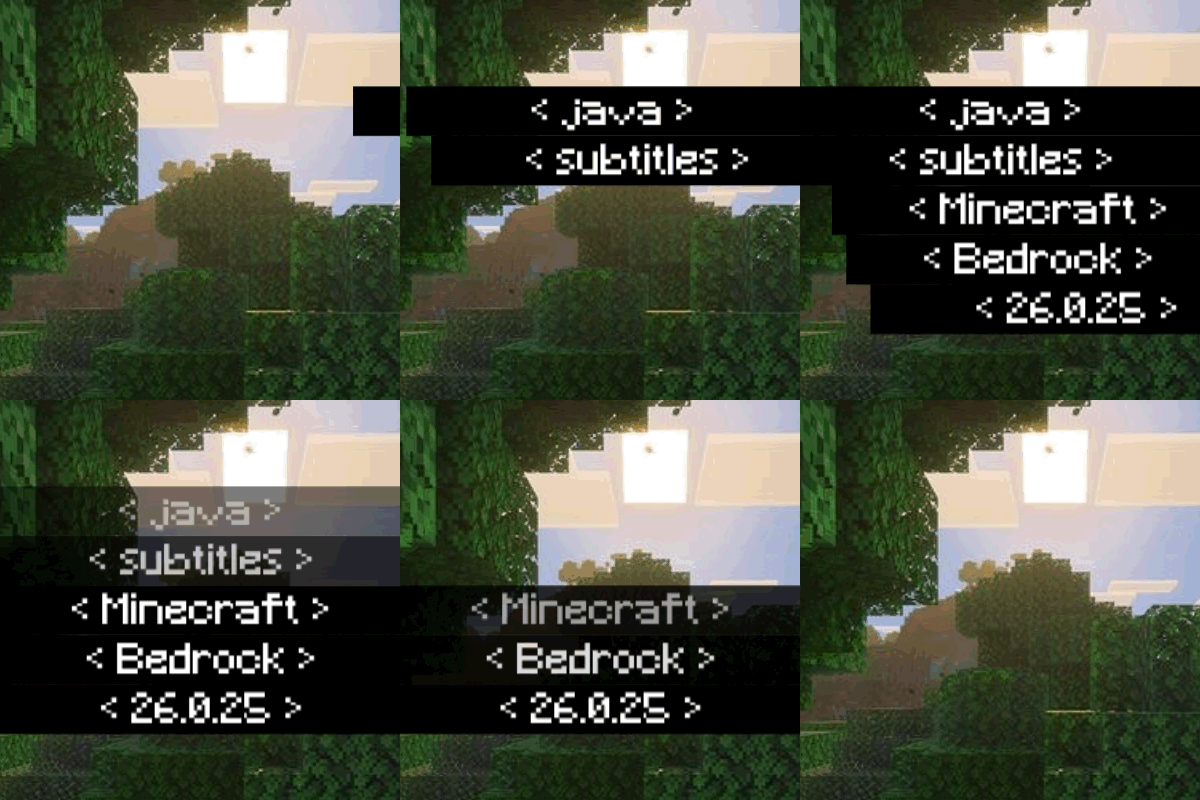
Java Subtitles animations
Java-Style Subtitles this texture pack repositions the Closed Caption feature recently added in Minecraft Preview 26.0.5 and moves it to the bottom left corner, similar to Minecraft Java.
This resource pack brings the Minecraft Java Edition subtitle style to Minecraft Bedrock Edition.
From the bottom-right position, text style, to the subtitle appearance animation, everything is designed to be as close as possible to the Java version.
With this pack, subtitles no longer appear stiff on the middle-right of the screen. Instead, they look cleaner, more modern, and more comfortable to use during gameplay.
✨ Perfect for players who want:
A Bedrock experience closer to Java Edition
A cleaner and more professional UI
Informative subtitles without blocking gameplay
📖 Features Explanation
🔹 Java-Style Subtitle Position
Subtitles are moved from the middle-right of the screen to the bottom-right corner, preventing them from covering gameplay and making them feel more natural—just like in Minecraft Java Edition.
🔹 Smooth Subtitle Animation
Each subtitle appears smoothly, rather than popping in instantly. This adds a modern and polished feel to the UI.
🔹 Comfortable & Informative
Subtitles remain easy to read and help players detect sound directions (such as footsteps, explosions, or mob sounds) without distracting from gameplay.
⚠️ Notes
This resource pack only changes the subtitle UI appearance and does not add new gameplay features.
Compatible with Minecraft Bedrock Update 26.0.25+.
Make sure Subtitles are enabled in the sound settings for the best experience.