
[Discontinued] Dimz Inventory Overlay
For those of you who want to share this, please use this page link: https://www.curseforge.com/minecraft-bedrock/texture-packs/dimz-inventory-overlay/download It leads directly to the latest file, so there's no need to use Mediafire, onegaii~
Join our community below!
DIscord Server | Telegram Group | Whatsapp Group(+62 only)
Showcase
Feature:
added an overlay feature in inventory that can be used to display armor and offhand slots on the hud
Info:
Subpacks:
- Default
- Only armor viewer and offhand slot
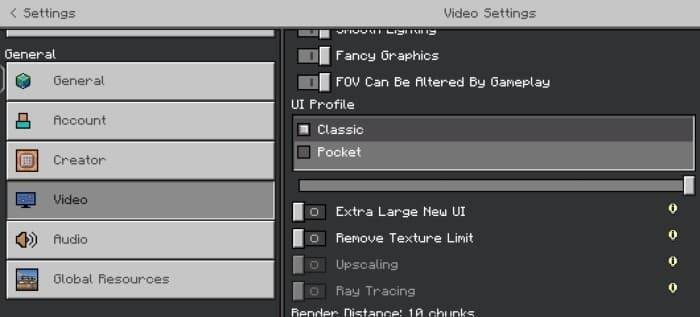
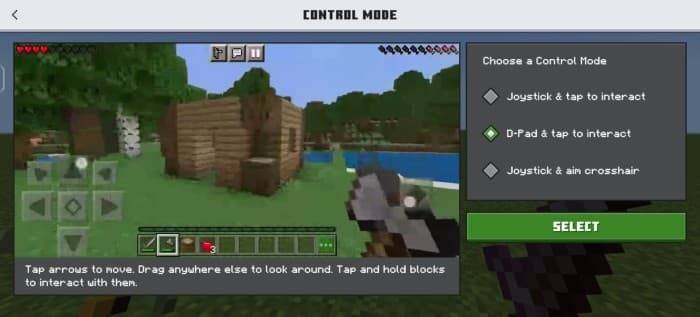
Settings needed:
- UI type: Classic
- Control: Touch, D-Pad
- GUI scale: -1 (for small devices)
Screenshots:
Known Issue: -
- When you are in the inventory overlay, you cannot open chests, furnaces, shulkers, and others.
Q: then How can I open it?
A: Just press the down arrow button next to the armor viewer, then you can open the chest, etc.
Screenshot:

- When in the inventory overlay, don't trade with a villager because it will cause the trade button to disappear.
Q: What if I accidentally press it?
A: Just log out of the world, exit the world, and enter the world.
- Control button will be visible in inventory, cannot be fixed.
Q: Why are there some areas in the inventory that can't be touched or cant craft item?
A: Because the control button is blocking input to the inventory, the way to overcome this is to change the GUI scale to be smaller or customize the control, move the button to the corner so it doesn't block the inventory, and make sure you use the D-Pad button.