
Custom Paintings | Instant image from web or camera roll

If you would like to make a server using custom paintings, consider hosting with GodLike! https://godlike.host/Jerryeatsbeans
How to Upload Images

This addon is used most easily on PC. Mobile devices can be supported with extra steps, and consoles may not be supported to my knowledge.
To start, grab a painting item and place it on a wall, it will immediately open a menu that looks exactly like this:
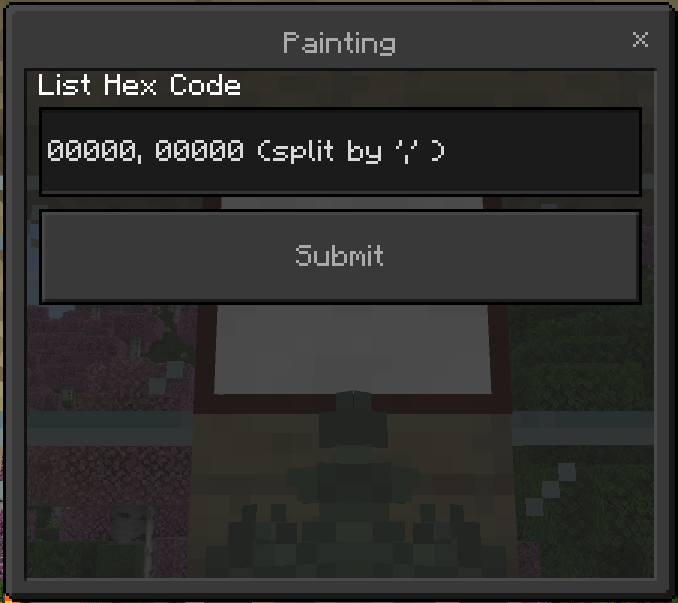
You’ll need a HEX code array for the image you’d like to upload. If that sounds confusing I’ll happily inform you that it’s very simple to obtain! Just continue reading this guide.
Head to the website https://jerryeatsbeans.com/Custom-Paintings/custompainting.html and click on the icon that says “Custom Paintings” it will bring you to this website:

From here, simply upload an image and select “Copy Hex” to get the text you need for minecraft
On mobile iOS and Android devices it might be difficult to paste text. There are some apps that do however add a "Paste" button to your keyboard. Check out PastePro or Auto Paste Keyboard


How to Break Paintings
To break a painting, simply crouch and punch it and the item will drop on the ground. Similar to an item frame.
How to Obtain the Paintings
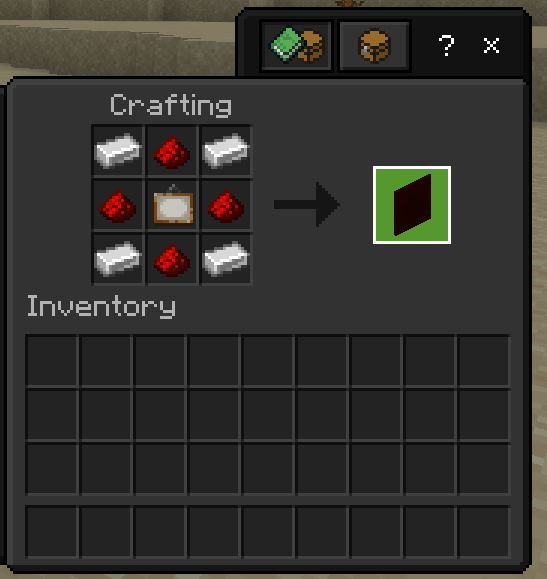
The painting can be crafted as follows:
Known Bugs
Having more than one painting in a small area causes lots of lag, especially on low end devices.