
Clean Chat & Scoreboard: No Black Backgrounds
Clean Chat & Scoreboard - No Black Backgrounds!
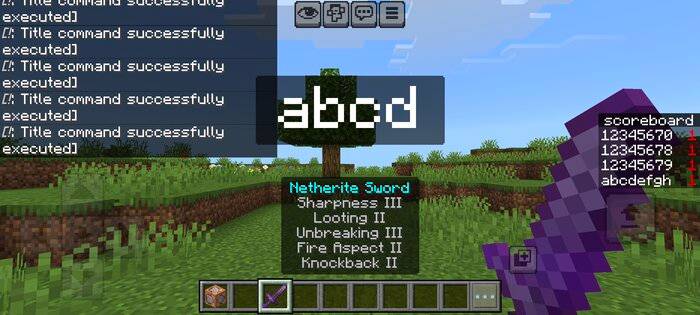
Before
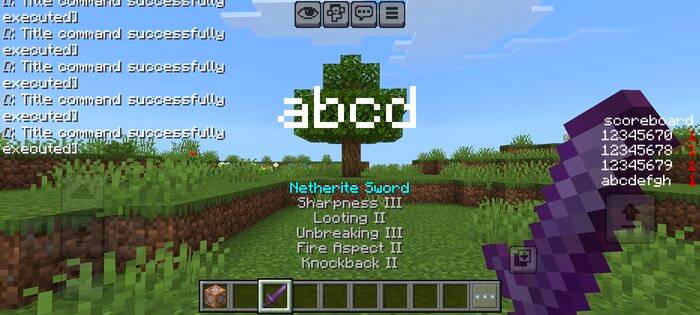
After
Are you tired of those clunky, dark boxes blocking your view? Clean Chat & Scoreboard is the ultimate resource pack for Minecraft Bedrock players who want a sleek, modern, and transparent HUD. This pack removes all unnecessary black backgrounds, letting you focus on the game, not the UI clutter.
Key Features:
Crystal Clear Chat: No more black overlays behind your messages.
Clean Scoreboard: Your rankings and stats now float perfectly on the screen without a dark background.
Action bar, title, name item: No stupid black background appears.
Minimalist UI: Removes black boxes from Titles, Subtitles, and Action Bars for a cleaner experience.
Performance Optimized: Lightweight and works on all Bedrock platforms (Mobile, PC, Console).
Installation Guide:
Download the .mcpack file.
Open it to import into Minecraft.
Go to Settings > Global Resources and activate Clean Chat & Scoreboard.
Important: Move this pack to the TOP of your active list to ensure it overrides other U
I textures.
