
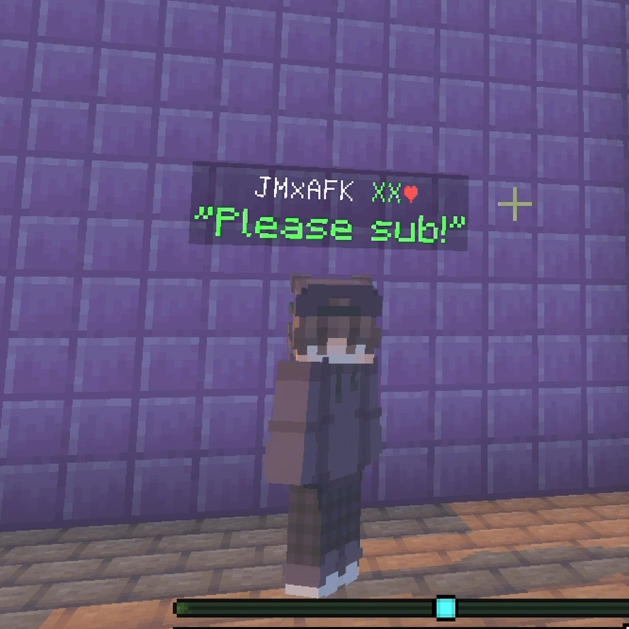
Below name chat and Proximity chat
💬 Enhance your Bedrock chat like never before! This addon adds global, clan, nearby, private, and below-name chats, full rank display, and anti-spam protection
7,312
💬 Minecraft Bedrock Chat Addon v1.4
📡 Advanced Chat Channel System
The core feature of this revamped version is the integrated channel switching system. You can change your active chat channel directly from the chat screen using the new UI buttons or quick-switch commands.
🎭 Chat Modes Explained
- 🌐 Global Mode: The standard server-wide chat. Everyone can see your messages regardless of where they are.
- 📍 Nearby Mode: Perfect for roleplay or small interactions. Only players within a 100-block radius will receive your message.
- 🛡️ Clan Mode: Automatically links with your Clan system. Only members of your specific clan will witness these tactical messages.
- 🕵️ Private Mode: Direct, secure messaging. Use
/chat p [PlayerName] [Message]to whisper. - 👤 Below-Name Mode: Instead of appearing in the chat box, your message floats directly under your name tag in the world for a few seconds.
⌨️ Updated Command List
💬 Shorthand Channel Switching
Quickly jump between channels without opening menus:
/chat g— Toggle into Global chat mode./chat c— Toggle into Clan chat mode./chat n— Toggle into Nearby chat mode./chat b— Toggle into Below-Name chat mode./chat— Cycles through all available modes one by one.
👥 Player Interactions
/chat request— (New!) Opens a form to request a custom Rank Tag (e.g., "Developer", "Specialist"). Admins will see this request in their settings./chat p <player> <message>— Send a secure private message./r <message>— Quick Reply to the last player who messaged you privately./chathelp— Displays a list of all available player commands and descriptions.
👑 Admin & Operator Commands
/chatadmin— Access the Revamped Master Panel. This is now the hub for:- Approving/Denying Rank Requests.
- Toggling "Global/Nearby/Clan" visibility.
- Managing Mutes and Spam Filters.
- Configuring Welcome Intro messages.
/chatdebug— For technical use: force-refresh rank displays and nametag logic.
🛠️ Integrated UI Design
The 1.4 Revamped version completely removes the slow "Fast Menu" in favor of a sleek, native-style Channel Dropdown on your chat screen.
- Open your Chat.
- Click the Channel Button (it shows your current mode, like "Global").
- Choose your new mode from the instant popup.
- Type your message—it’s that simple
Version: 1.0.8 (Revamped)
Author: JMAFKBEDROCK
License: All rights reserved
All Rights Reserved
04/11/2025
23:50 04/06