
[BEDROCK PORT] Vani's Pan CIT 1.26+
Made by Vani

What is Vani's Pan CIT?
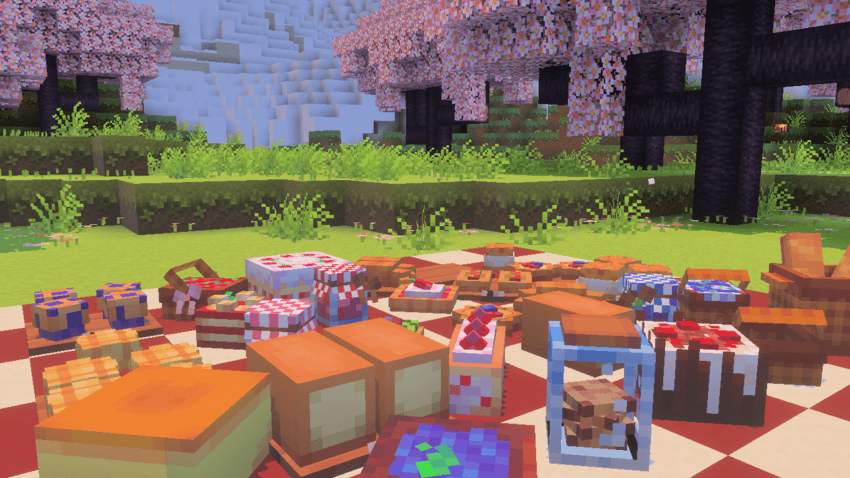
This project is a sweet port of a Java CIT (Custom Item Texture) pack to Minecraft Bedrock Edition made by Vani, designed especially for pastry lovers. It brings a charming collection of pastry-themed delicacies into your world, turning simple items into detailed and delicious-looking desserts. From flaky croissants to frosted cupcakes, each item has been carefully crafted to add a sweet aesthetic touch to your builds, shops, kitchens, and roleplay maps.
Whether you're a builder, decorator, or just a fan of all things baked, this pack adds a cozy and mouthwatering vibe to your Minecraft experience—now fully optimized for Bedrock players!
How to download and install?
Playing with the pack and port permission:
The section shows the permission to port the pack to bedrock from the creator.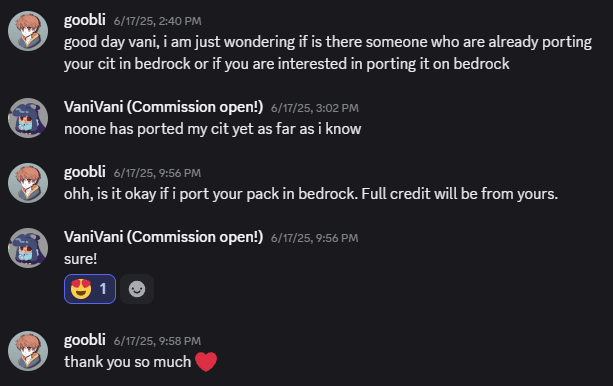
I tested it on these minecraft bedrock version and it works on Windows 10, Android, & Apple Devices – Running Minecraft Bedrock/Pocket Edition 1.21.20 and above. I dont know if it works on consoles or playstation! {Keep in mind that you dont need to download Goobli Tools in order to rotate the items, just use your hand and interact the foods to rotate}

Vani's and Gooblicraft's Terms Of Use
All Models created by Vani are intellectual property of him/her, unless otherwise noted or permitted to be use for other project (must have permission from the creator).
Items and codes created by Gooblicraft are intellectual property of him/her, I advised to ask first at me for the permission if you have something to access from the pack.
- Do not redistribute the pack as your own, or claim it as your own creation. (This includes re-porting the pack to BE/PE)
- Do not modify the pack without express written permission from Vani
- Do not upload the packs to any websites.
- Do not claim the models or textures as your own.
- Do not modify the models or textures without express permission from Vani.
- Do not steal the models & make "remix" packs.
Vani's Crafting Recipes
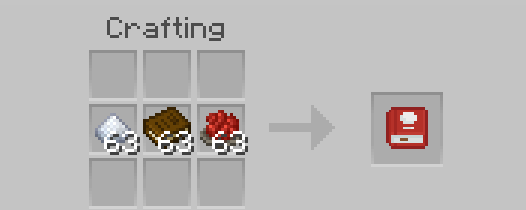
Vani's Recipe Book
How to get the items in Survival Mode?
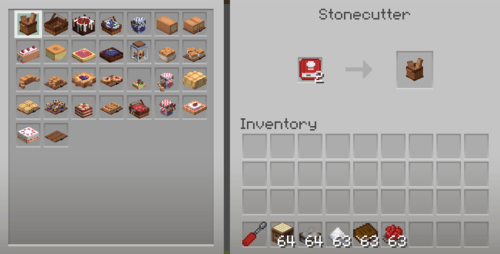
Put the recipe book on the stonecutter
Importing
- Download the pack from any of this website PMC, MCPEDL, or Curseforge.
- Click on the file and open it to Minecraft.
- Create a New World.
- In the Game Tab, turn on the following: Creative.
- Go to Resource Packs Tab and enable the pack there.
- Go to Behavior Packs Tab and make sure the pack`s behavior is also enabled.
- Play on the world and do a test by going to creative menu and look for items.
- If you got the item or it shows, congrats! You just installed the pack into your game and it's working fine.
Updating
- Make sure to make a backup of your world first!
- Delete the old version or remove/disable the old version into your world.
- Download the new updated pack on the following website MCPEDL, PMC or Curseforge.
- Click on the file and open it to Minecraft.
- Apply the new pack on your existing world.
- If you didn`t deleted the old version, make sure you`re applying the same (new) version of the pack`s Resource Pack and Behavior Pack in your world.
- I recommend the old version of pack when updating to avoid false overwritten when playing the addon
Having troubles?
Join in our Discord Server. Please do not comment your Issue in other channels to maintain a neat user experience on the server.