Administrator Control Panel - Achievement Friendly
Administrator Control Panel - Achievement Friendly
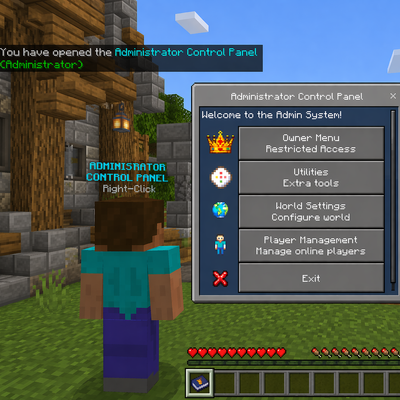
The Administrator Control Panel is an achievement-friendly Minecraft Bedrock Edition admin system designed for Realms, worlds, and servers. It provides a modern UI-based management system with customizable admin ranks, permission controls, utilities, player management tools, and world management features — all without requiring cheats or Beta APIs.
The addon is designed to work with survival worlds while keeping achievements enabled.
# Features
- Achievement-friendly design
- No cheats required
- No Beta APIs required
- Fully UI-based admin system
- Custom admin rank system
- Permission-based menus
- Works on:
- Singleplayer worlds
- Multiplayer worlds
- Realms
- Dedicated servers
# Custom Admin Rank System
Create unlimited custom admin ranks with fully customizable permissions.
Examples:
- Owner
- Moderator
- Helper
- Builder
- Event Staff
- Trial Admin
Each rank can have its own permissions enabled or disabled.
# Permission System
Permissions include:
- Kick Players
- Teleport Players
- Change Player Gamemode
- Personal Gamemode
- Run Commands
- Fill Commands
- World Settings
- Utilities Access
- Spectator Chest Viewer
- Clear Floating Items
- And more
Menus automatically update based on the player's assigned permissions.
# Player Management
Manage players directly through UI menus.
Features include:
- Set Survival
- Set Creative
- Set Adventure
- Set Spectator
- Teleport To Players
- Teleport Players To You
- Random Teleport
- Levitate Players
- Kick Players
# Personal Gamemode
Admins can quickly change their own gamemode using the Personal Gamemode menu.
Supported gamemodes:
- Survival
- Creative
- Adventure
- Spectator
# Admin Menu Access
The addon supports two admin menu access methods.
## Option 1 (Recommended)
Use the included admin item:
- admin:rod
## Option 2
Rename ANY item to:
- Admin Settings
Then use the renamed item to open the admin menu.
Renamed items:
- Keep their custom name
- Support keep on death
- Continue working after updates
# Language Support
Includes support for:
- English
- Thai
อัปเดตใหม่ รองรับภาษาไทยแล้ว
The addon uses Minecraft Bedrock language files for improved compatibility with multiple languages.
# Installation
# New Installation
1. Download the addon
2. Import the:
- Behavior Pack
- Resource Pack
3. Activate both packs on your world
4. Join the world
5. The first player to join becomes the permanent owner
# Updating The Addon
1. Remove the OLD versions of:
- Behavior Pack
- Resource Pack
2. Import the NEW versions
3. Re-enable both packs on the world
4. Load the world
Your saved admin data, ranks, and settings should remain intact.
# Important Update Notes
- Do NOT change dynamic property keys
- Always keep both packs updated together
- Back up your world before major updates
- Old admin items may update automatically when used
# Compatibility
Compatible with:
- Minecraft Bedrock Edition
- Realms
- Dedicated Servers
- Multiplayer Worlds
Designed for long-term survival gameplay and admin management without disabling achievements.
Changelog v3.0.5
# Menu Behavior Changes
- Updated admin menus to close after completing an action instead of automatically reopening the same menu
- Improved overall menu flow to feel cleaner and less repetitive during repeated admin actions
- Reduced accidental duplicate actions caused by menus reopening immediately after selection
# Utilities Menu Improvements
- Added a confirmation menu before clearing floating items
- Helps prevent accidentally removing dropped items from the world
- Updated utility actions to close properly after use:
- Clear Floating Items
- Spectator Chest Viewer Toggle
- Fill Commands Actions
- Run Command Actions
# Player Management Improvements
- Replaced player management dropdown menus with button-based menus
- Updated Game Mode management to use dedicated buttons:
- Creative
- Survival
- Spectator
- Adventure
- Updated Teleport actions to use dedicated buttons:
- Teleport Player To You
- Teleport To Player
- Random Teleport Player
- Reduced menu navigation steps when managing players
- Updated player management actions to return cleanly after actions are completed:
- Kick Player
- Teleport Actions
- Gamemode Changes
- Levitate Actions
- Admin Assignment Actions
# World Spawn Improvements
- Added a confirmation menu before changing the world spawn location
- Confirmation menu now displays the exact coordinates where the new world spawn will be set
- Helps prevent accidentally changing the world spawn while using admin tools
# Settings Menu Improvements
- Updated world settings menus to close after applying changes:
- Weather Settings
- Time Settings
- Difficulty Settings
- Keep Inventory
- Mob Griefing
- Tick Speed
- Command Feedback
- Max Players
# UI Updates
- Improved menu navigation behavior
- Reduced unnecessary menu reopening
- Cleaner user experience after applying actions
- Improved responsiveness when using admin tools repeatedly
- Improved button layouts throughout player management menus
- Reduced reliance on dropdown menus for common actions
# Internal Changes
- Updated menu return handling across multiple admin files
- Improved action flow consistency between menus
- Cleaned up menu navigation logic for future updates
- Refactored player management menu structure to support button-based action selection
- Added world spawn confirmation handling and coordinate display support
- Added clear floating items confirmation handling and localization support
# Changelog v3.0.4
# Time Settings Fix
- Fixed time changes resetting the world back to Day 1
- Time buttons now move time forward to the next selected time instead of resetting the day count
- Updated preset time options:
- Day
- Night
- Midnight
- Sunset
- Sunrise
# Improvements
- Time changes now better preserve world progression
- Improved behavior for worlds where admins adjust time often
# Changelog v3.0.3
# Admin System Overhaul
- Removed fixed admin tiers:
- Basic Admin
- OP Admin
- Replaced with fully customizable admin rank system
# Custom Admin Ranks
- Added unlimited custom admin ranks
- Added custom rank names:
- Starter Admin
- Moderator
- Helper
- Or any custom name
- Added per-rank permission toggles:
- Kick Players
- Teleport Players
- Change Gamemode
- Personal Gamemode
- Run Commands
- Fill Commands
- Clear Dropped Items
- Utilities Access
- World Settings Access
- And more
# Player Admin Management
- Added player-to-rank assignment system
- Added ability to edit admin roles at any time
- Added support for online and offline player management
- Added admin list viewer
- Added easier admin removal system
# Permission-Based UI
- Menus now dynamically show only allowed actions
- Prevents unauthorized actions from appearing
- Simplified menus for each admin rank
# Personal Gamemode Feature
- Added new Personal Gamemode menu
- Allows admins to quickly change their own gamemode
- Added permission toggle support for Personal Gamemode
- Supports:
- Survival
- Creative
- Adventure
- Spectator
# Utilities Menu Updates
- Utilities are now fully permission-based
- Added toggle support for:
- Fill Commands
- Run Commands
- Clear Floating Items
- Spectator Chest Viewer
# Admin Item System Changes
- Removed automatic admin item giving
- Added renamed-item admin menu support:
- Rename ANY item to "Admin Settings"
- Use the renamed item to open the admin menu
- Added player notification explaining how to access the menu
# Renamed Admin Item Improvements
- Admin Settings renamed items now:
- Keep their custom name
- Automatically update with keep on death
- Continue working across updates
- admin:rod is still fully supported
- Removed inventory lock behavior from admin items
- Admin items now use keep on death only
# Language Support Improvements
- Added additional language key support for:
- Admin menus
- Permissions
- Messages
- Personal Gamemode
- Custom admin ranks
- Improved Thai language compatibility
- Added new Thai translations for added features
# Mute System Removal
- Removed mute system due to API limitations
- Prevents broken or non-functional menu options
- May return in a future update if API support improves
# Code Cleanup & Stability
- Removed unused mute system code
- Cleaned up legacy admin logic
- Improved renamed-item detection reliability
- Improved error handling
- Improved compatibility across Bedrock versions
- General performance and stability improvements
Join my discord.